Sep 10, 2026
Digital menu boards in practice: from a printed menu to a screen that updates itself
Digital menu boards that update themselves: switching by time of day, pulling prices from Google Sheets, on the TV you already have. Here's how it works in practice.
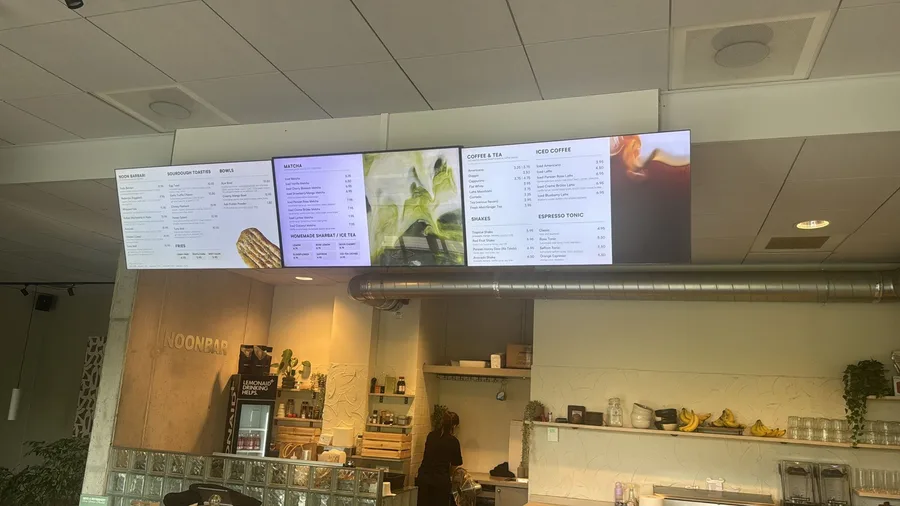
A lunch café, two locations, three printed menu boards above the counter. Every price change means printing all over again, sold-out dishes get crossed out with a marker, and the special of the day is taped to the register on a sheet of paper. Sound familiar? This is the starting point for most owners who switch to digital menu boards. In this article we walk through what that switch looks like in practice: what you need, how to set it up in an afternoon, and what it costs.
Why owners switch to digital menu boards
The trigger is rarely a craving for technology. It's almost always one of these three frustrations.
- A price or a dish changes, and the board lags behind until someone has time to print.
- The special with the best margin is on a scrap of paper, while the menu board is full of what already sells well anyway.
- With multiple locations, the menu differs from one spot to the next, and nobody knows exactly where.
A digital menu board solves all three with the same principle: you manage the content in one place, and the screens pull it in themselves.
What you need, and what you don't
Important to be clear on up front: Stremo is the software that drives your menu boards. The screen is up to you. That sounds like a limitation, but it's actually the advantage: you're not locked into expensive, specialized displays.
- A screen: any TV or monitor with an HDMI port works. Already have a television on the wall? Then you can use it.
- A smart TV? Then you install the Stremo app and need nothing else. No smart TV? Then you connect the screen with a Stremo Player for $99 ($149 with ethernet).
- An internet connection, over Wi-Fi or cable. If it drops, the board simply keeps running on the locally stored content.
- A Stremo account, free to get started.
Would you rather not deal with the hardware at all? For ten or more screens, we deliver and install everything on-site as part of the Enterprise plan. For smaller setups we're happy to advise on a suitable screen, but you handle the purchase and mounting yourself or through your own installer.
Setting up digital menu boards in an afternoon
Back to the lunch café. Here's what the switch looks like step by step, and it's realistic to do in a single afternoon.
1Step 1: connect the screen
The existing TV above the counter stays right where it is. If it's a smart TV, you install the Stremo app. If not, a Stremo Player goes into the HDMI port. Either way, a pairing code appears on the screen. You enter that code in the dashboard. The screen is now in your account. That's the entire technical part.
2Step 2: build the menu board
In the slide builder you pick a menu template and drop in your logo, colors, and photos. Already have a design in Canva or PowerPoint? You can reuse it, so you don't start from scratch. For a lunch café, splitting things across three screens works well: drinks on the left, sandwiches and hot dishes in the middle, specials and promotions on the right.
3Step 3: schedule by time of day
This is where the board gets smarter than paper. In the schedule you set it once a week: the breakfast menu until 11 a.m., then lunch, and dinner from 5 p.m. The screens switch on their own, every single day. You schedule specials at fixed times, for example the lunch deal only between noon and 2 p.m. You can always step in manually, even from your phone when you're not on-site.
4Step 4: connect prices to a single source
The biggest time savings are here. Put your dishes and prices in a Google Sheet and connect it to the menu board. Change a price in the sheet and it's on every screen within a minute. Out of a dish? Mark it "sold out" and it disappears from the board. If you use a point-of-sale system, an integration with it is often possible too.
5Step 5: adding the second location
For the second location you repeat step 1 and put its screens into a separate group. Now you can choose: the same menu at both locations, or a different offering per location. With user roles you give the on-site manager the right to update the special, without letting them touch the settings of the other location.
What digital menu boards cost
Because the screen is your own choice, the math is straightforward. You pay for the software per screen, per month.
- Free trial: 14 days, one screen, with a Stremo watermark on screen. Enough to test on the TV you already have.
- Stremo Basic: $10 per screen per month when billed annually, or $13 per month if you want to cancel monthly. All modules, unlimited switching, multiple screens.
- Stremo Enterprise: on request, from ten screens up. Includes a permissions structure for multiple locations, custom integrations, and delivery plus on-site installation.
For the lunch café in the example, with three screens per location on existing TVs, that comes to six times $10, or $60 per month. If the TVs run the Stremo app, nothing is added to that. For TVs without a smart function, you pay a one-time $99 per Stremo Player, or $149 for the version with ethernet. Nothing else: no setup fees, no three-year contract. Work it out for your own business below.
Work it out for your business
Software
$60 per month
One-time
$0 no media players needed
No setup fees, cancel monthly or annually. Including screens and installation? Use the price calculator.
Want a more concrete picture up front, including any screens and installation? With the price calculator on the site, you answer four questions and instantly see an estimate of your monthly and one-time costs.
Mounting digital menu boards: what to think about beforehand
- Brightness: an ordinary TV is fine in a space without direct daylight on the screen. If the board faces the storefront window, choose a brighter model.
- Portrait or landscape: a price list often works better in portrait, photos of dishes better in landscape. Stremo supports both, set per screen.
- Access: mount the screen so you can reach the connections. Swapping out a media player should take no more than a minute.
- Monitoring: the dashboard shows you right away when a screen goes offline, so you catch it before a guest does.
Frequently asked questions about digital menu boards
Do I need to buy new screens?
No. Any TV with HDMI works. If you have a smart TV, Stremo runs as an app; otherwise you connect it with a Stremo Player for $99 ($149 with ethernet). Many owners start on the TV that's already on the wall.
Can each screen show something different?
Yes. Each screen or group of screens has its own playlist and schedule. A drinks board above the bar and a menu board at the entrance are two different screens, each with its own content.
What if the internet goes down during lunch?
The board keeps running. The content is stored locally on the player; as soon as the connection is back, changes are fetched automatically.
Can I update it from my phone?
Yes. The dashboard works in the browser, so it works on your phone too. Changing a special from the couch takes half a minute.
Try it yourself on the TV you already have
The fastest way to find out whether digital menu boards suit your business is to simply try them for a week on an existing screen. Try Stremo free for 14 days. You don't need a credit card, and your first menu board is live within minutes.