Oct 5, 2026
AI content for your screens: create professional digital signage faster
With AI, you create professional content for your digital signage screens in minutes. Discover how AI content works and how to get started with it.
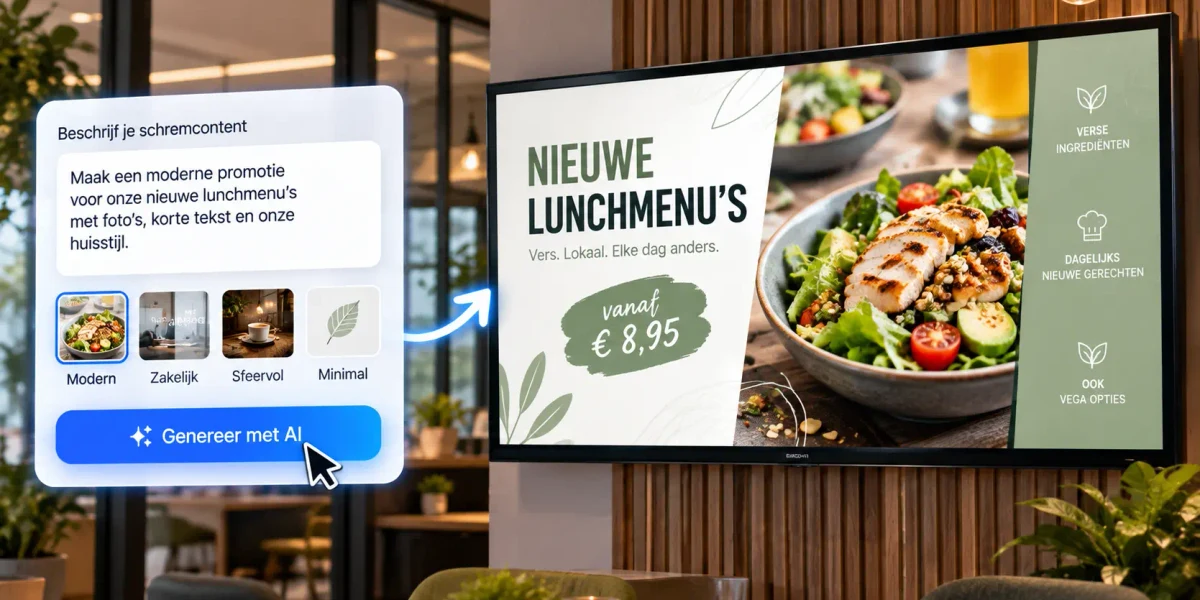
The biggest challenge with narrowcasting isn't the screen — it's the content: it needs to be fresh, professional, and ready on time. That's exactly where AI helps. With just a few sentences as input, you create images, video, and text for your screens in minutes. In this article you'll read what AI content for digital signage involves, why it's the trend of 2026, and how to get started with it the smart way.
What is AI content for digital signage?
AI content means using artificial intelligence to create material for your screens: images, short videos, text, translations, and even complete templates, generated from a simple instruction (a 'prompt'). For example, you type 'create a fall promotion visual in my branding' and get a usable design back within a minute. Where you used to need a designer or a lot of time, you now quickly put together professional-looking content yourself, even without any design experience. So you no longer have to bring in expensive software or a specialist for every change.
Why AI content is the trend of 2026
In the leading digital signage reports for 2026, AI content generation tops the trend lists. The reason is simple: it removes the biggest hurdle. Screens that aren't updated lose their impact, and keeping content current has always cost time and money. Not every company has a dedicated designer or a large marketing department, and that's exactly where AI makes the difference. AI makes that process faster and more accessible, so even smaller organizations can keep their screens fresh and relevant without spending hours a week on it.
What can you create with AI for your screens?
- Images: atmospheric and promotional images that match your branding, without a photo shoot.
- Video: short, attention-grabbing clips in portrait or landscape format.
- Text: catchy headlines, offers, and announcements in the right tone.
- Translations: your content in multiple languages for a diverse audience.
- Templates: reusable layouts, so every message looks polished and consistent.
How to use AI content with Stremo
Stremo works together with tools you probably already know. You create your content in, for example, Canva, PowerPoint or Figma — with AI assistance if you like — and connect it directly to your screens. Many of those tools now have AI features built in, so you go from idea to finished design without switching programs. The process stays simple: create or generate content, schedule it with daily and weekly schedules, and publish. Your changes appear within seconds on all screens, in every location. That's how you combine the speed of AI with the central, clear management of Stremo.
Tips for good AI content on screens
- Keep it short and big: a screen gets looked at for just a few seconds, so stick to one message.
- Stay on brand: use your own colors, logo, and font, in AI content too.
- Make sure there's contrast: easy to read from a distance and in a bright space.
- Check the facts: always double-check prices, names, and figures that AI generates.
Stay in the driver's seat
AI is a powerful helper, but it's no substitute for your own judgment. You get the best results by letting AI do the heavy lifting while you keep control of your brand and message. That way you avoid generic content — the so-called 'AI slop' you see everywhere — and keep your screens recognizable and professional. Quickly review every generated text or image before you publish: is the tone right, does it fit your branding, and is the information correct? Use AI to work faster, not to stop thinking.
Which AI tools can you use?
You don't have to buy expensive specialized software. Many tools you may already use now have AI built in:
- Design tools like Canva with built-in AI for images, text, and templates.
- Text AI like ChatGPT for catchy headlines, offers, and multilingual copy.
- Image and video AI to quickly generate atmospheric visuals or short clips without a photo shoot.
- Presentation tools like PowerPoint with AI design assistance, which you connect directly to Stremo.
The trick isn't to use as many tools as possible, but to choose a few that fit the way you work and that integrate seamlessly with your digital signage software.
From idea to screen in four steps
Here's what a practical workflow looks like when you create AI content for your screens:
1Decide on your message
What do you want to show today, and to whom?
2Generate your content
Have AI create an image, text, or video based on a short prompt.
3Finish it in your branding
Add your logo, colors, and the right tone.
4Schedule and publish
Put it on the right screens and times through Stremo; within seconds it's live.
AI content by industry: examples
AI content is useful for just about every industry, because every sector has something to say on screen. A few examples:
- Hospitality: quickly generate changing daily menus and atmospheric visuals that match the season.
- Retail: create promotional visuals for a sale or new collection in a snap.
- Healthcare: turn information for patients into clear, calm visuals, in multiple languages too.
- Office: translate company news and figures into appealing screen cards.
- Education & sports: quickly make announcements for schedules, events, and club news.
Frequently asked questions about AI content
Do I need design experience?
No. That's exactly the strength of AI content: a short description is enough to produce usable material. You then finish it off neatly in your own branding using familiar tools like Canva.
Isn't AI content impersonal?
It doesn't have to be. Use AI for the heavy lifting, but keep control of your brand, tone, and message yourself. Add your own photos, logo, and colors, and your content stays recognizable and personal.
Does AI content work with Stremo?
Yes. You create content in the tools that connect to Stremo (such as Canva, Figma, and PowerPoint) and publish it directly to your screens. AI speeds up the creating, Stremo handles the showing and scheduling.
Does AI content cost extra?
Many AI features are already built into tools you probably use, sometimes for free and sometimes in a paid subscription. The biggest gain is the time you save: content that used to take hours, you now create in minutes.
Conclusion
AI content makes digital signage faster, cheaper, and more accessible. You keep your screens effortlessly fresh, even without a design department, and stay relevant to your audience. Combine the speed of AI with the central management of Stremo, keep control of your brand, and your screens work for you every day, with less effort than ever. Try Stremo free for 14 days and see for yourself how fast you can fill your screens.